System Diagnostics (doctor)
Dux Shell
System Diagnostics (doctor)
The dms doctor command diagnoses your DMS installation, verifies dependencies, and checks system configuration. Use it to troubleshoot issues or verify your setup is complete.
Usage
dms doctor           # Standard output
dms doctor -v        # Verbose output with paths and details
dms doctor -j        # JSON output for scripting
Status Indicators
| Icon | Status | Meaning |
|---|---|---|
| 🟢 | OK | Check passed |
| 🟡 | Warning | Non-critical issue, may affect some features |
| 🔴 | Error | Critical issue that needs attention |
| ⚪ | Info | Informational, no action needed |
System Checks
Operating System
All GNU/Linux distributions are supported - this information is purely informational.
Architecture
Only amd64/arm64 is officially supported, although other architectures may work with manual compilation.
Display Server
DMS only supports Wayland, this check verifies you're not using X11.
Version Checks
DMS CLI
DMS CLI is the backend and command-line interface for DMS. Its version should match the version of the quickshell configuration.
Quickshell
Quickshell is the framework used by DMS. Older versions of quickshell may result in a reduced feature set within DMS.
If the version check fails, run:
qs --version
An undefined symbol error mentioning Qt_6_PRIVATE_API means Quickshell was built against different Qt libraries than those currently installed. Rebuild or reinstall Quickshell against the current Qt version, then restart DMS.
On Arch Linux, rebuild the AUR package:
paru -S quickshell-git --rebuild
# or
yay -S quickshell-git --rebuild
systemctl --user restart dms.service
DMS Shell
The version of the shell configuration, which should match the DMS CLI version.
Installation Checks
DMS Configuration
By default DMS installs its configuration, plugins, and themes in $XDG_CONFIG_HOME/.config/DankMaterialShell/. This check verifies that the configuration directory exists.
shell.qml
The location of the shell.qml is the installed location of the DMS shell configuration.
Install Type
system: Installed via system package manager (e.g.apt,dnf,pacman)user: if manually installed via manual compilation & installationnix: if installed via Nix package manager
Compositor Checks
All wayland compositors that implement the layer shell protocol are supported, with varying feature sets.
Supported Compositors
| Compositor | Detection | Version Parsing |
|---|---|---|
| niri | niri | niri --version |
| Hyprland | hyprland, Hyprland | hyprctl version |
| mangowc | mangowc | mangowc --version |
| labwc | labwc | labwc --version |
| Sway | sway | sway --version |
| Miracle WM | miracle-wm | miracle-wm --version |
| River | river | river -version |
| Wayfire | wayfire | wayfire --version |
Active Compositor
Currently running compositor.
Quickshell Features
These features depend on how Quickshell was built. Using quickshell-git provides full feature support, some builds of quickshell can exclude features based on compilation options.
All of these features currently require quickshell-git or quickshell from the Dank Linux repositories (Fedora, Debian, Ubuntu, OpenSUSE)
Polkit
Polkit is used for escalation prompts, items that require root authorization.
IdleMonitor
Used to automatically lock, power off monitors, suspend, or hibernate.
IdleInhibitor
Used to prevent the system from idling or sleeping.
ShortcutInhibitor
Used to manage keyboard shortcuts, specific to the niri compositor.
Optional Features
accountsservice
Required to persist user profile changes, such as profile picture.
power-profiles-daemon
Required to manage power profiles. (e.g. performance, balanced, power-saver)
Either power-profiles-daemon, tuned together with tuned-ppd or tlp together with tlp-pd satisfies this check. tuned-ppd and tlp-pd exposes the same D-Bus interface that power-profiles-daemon does, so DMS works with them too. power-profiles-daemon, tuned and tlp conflict, so install only one of them.
cups-pk-helper
Required for printer management (adding, deleting, and configuring printers). Provides the org.opensuse.CupsPkHelper.Mechanism D-Bus interface.
I2C/DDC
Required for external monitor brightness control, on most distributions requires i2c-tools and the user to be in the i2c group.
qt6-imageformats
Qt image format plugins adding WebP, TIFF, GIF, JP2, and ICNS support — used for wallpapers, notification images, and previews.
| Distribution | Package |
|---|---|
| Arch | qt6-imageformats |
| Fedora | qt6-qtimageformats |
| Debian/Ubuntu | qt6-image-formats-plugins |
| openSUSE | qt6-imageformats |
| NixOS | qt6.qtimageformats |
kimageformats
KDE image format plugins adding AVIF, HEIF, JXL, and EXR support.
| Distribution | Package |
|---|---|
| Arch | kimageformats |
| Fedora | kf6-kimageformats |
| Debian/Ubuntu | kimageformat6-plugins |
| openSUSE | kf6-kimageformats |
| NixOS | kdePackages.kimageformats |
Terminal
Detected terminals (in priority order): ghostty, kitty, alacritty, foot, wezterm
matugen
DMS leverages matugen with custom color enrichment (dank16) to generate themes for itself and various applications, terminals, and IDEs.
dgop
Required to use system monitoring widgets and applets (CPU, RAM, Disk, Network, Processes). See dgop documentation for more information.
cava
Required for audio visualization in media players.
khal
Required to enrich calendar with events from local, CalDAV, or other sources supported by khal.
adw-gtk3
Required for dynamic GTK3 theming: DMS copies the theme (light and dark variants) into ~/.local/share/themes and patches the copies with your generated colors, so GTK3 apps follow the system color-scheme live. The row shows which mode is active:
- Installed (user copy) — dynamic theming is active.
- Installed (system copy) — installed via your package manager; DMS creates the user copy the next time GTK theming applies.
- Missing adw-gtk3(-dark) — only one variant found; dynamic theming needs both.
- Not installed — GTK3 falls back to a global
dank-colors.cssimport; colors still apply, without live light/dark switching.
| Distribution | Package |
|---|---|
| Arch | adw-gtk-theme |
| Fedora | adw-gtk3-theme |
| NixOS | adw-gtk3 |
Debian, Ubuntu, and openSUSE do not package it; extract an upstream release into ~/.local/share/themes instead — DMS uses it from there directly.
See Application Themes for details.
Network
Detected backends: NetworkManager, iwd, systemd-networkd, iwd+systemd-networkd.
DMS supports different network stacks, NetworkManager is recommended for the vast majority of use cases as its also compatible with Gnome, KDE, etc. This is purely for integration within the shell itself (such as conencting to networks, viewing network status, etc.)
- NetworkManager : all features supported (Wifi, Ethernet, VPN)
- iwd : Wifi only, no Ethernet or VPN support
- systemd-networkd : Ethernet only, no Wifi or VPN support
- iwd+systemd-networkd : Wifi and Ethernet supported, no VPN support
gp-saml-gui
Required for GlobalProtect VPN connections that use SAML (browser-based) authentication. When a GlobalProtect connection requires SAML, DMS launches gp-saml-gui to open a browser window for login, then captures the resulting authentication cookie.
openconnect
Required for GlobalProtect SAML VPN connections and Fortinet VPN profiles that use password authentication.
- For GlobalProtect SAML, openconnect converts the prelogin cookie from
gp-saml-guiinto an authentication cookie that NetworkManager can use. - For Fortinet password profiles started from the DMS VPN widget, DMS uses
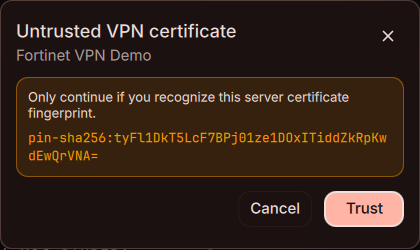
openconnect --authenticatedirectly and passes the short-lived cookie to NetworkManager. If the VPN server certificate is not trusted, DMS displays its fingerprint for confirmation and saves the approved fingerprint only after the tunnel connects successfully.
Native Fortinet authentication currently applies to profiles with protocol=fortinet and authtype=password. OTP/MFA challenge forms and other OpenConnect protocols are not included in this flow.
danksearch
Used for indexed filesystem search in the launcher. Use / to initiate a fs search. See DankSearch documentation for more information.
loginctl
Available on systems using systemd or elogind. Used for various session management features such as lock integration, lock before suspend, etc.
fprintd
Adds fingerprint authentication support to the lock screen.
Configuration Files
| File | Location | Purpose |
|---|---|---|
settings.json | ~/.config/DankMaterialShell/ | Main settings |
clsettings.json | ~/.config/DankMaterialShell/ | Clipboard settings |
plugin_settings.json | ~/.config/DankMaterialShell/ | Plugin configuration |
session.json | ~/.local/state/DankMaterialShell/ | Session state |
dms-colors.json | ~/.cache/DankMaterialShell/ | Cached color scheme |
Services
dms.service
If in use, DMS lifecycle will be managed by systemd. This is optional, DMS can also be started manually or via other init systems.
graphical-session.target
Only reported when dms.service is installed and enabled. Warns with Inactive when the target exists but is not active in the current session.
dms.service is tied to graphical-session.target (WantedBy, PartOf, Requisite), and systemd never activates that target on its own. The compositor session has to start it. If nothing does, dms.service is enabled but never autostarts, and systemctl --user start dms fails on the Requisite dependency.
Check the current state:
systemctl --user status graphical-session.target
Compositors with native systemd session integration (niri) activate the target themselves. Others need a compositor-specific session target that pulls it in, started from the compositor config.
On Hyprland, hyprland-session.target must exist and Hyprland must start it. dankinstall writes this unit; a hand-written one is left alone:
[Unit]
Description=Hyprland Session Target
BindsTo=graphical-session.target
Before=graphical-session.target
Wants=graphical-session-pre.target
After=graphical-session-pre.target
Hyprland then needs to export its environment and start the target:
hl.on("hyprland.start", function()
  hl.exec_cmd("dbus-update-activation-environment --systemd --all")
  hl.exec_cmd("systemctl --user start hyprland-session.target")
end)
Starting it by hand confirms the wiring before relogging:
systemctl --user daemon-reload
systemctl --user start hyprland-session.target
systemctl --user status graphical-session.target dms
See Installation for the equivalent setup on Sway, MangoWC, and Miracle WM.
greetd
Required for the Dank Greeter. (See DankGreeter documentation for more information.)
Environment Variables
QT_QPA_PLATFORMTHEME
Used to set the Qt platform theme - usually one of gtk3, qt6ct, or kde. This will define how QT applications are themed. Including some elements of DMS (such as icon themes)
qt6ct-kde is the package name (AUR), not a theme value — the value Qt expects is qt6ct. With qt6ct-kde set as the value, Qt apps load no platform theme at all: palettes stay unstyled and icon lookups fail, which shows up in Quickshell tray menus as black/magenta placeholder icons. dms doctor flags this misconfiguration and prints the fix.
When the variable is set, dms doctor also verifies that the plugin it names actually exists in the plugin directory Qt searches (asked via qmake/qtpaths), warning with the expected path on a miss. Without Qt development tools installed, the check reports "Cannot verify" instead of guessing.
QS_ICON_THEME
Optional environment variable to set the icon theme for DMS only. Will not effect other applications.
XDG_MENU_PREFIX
Required by KDE applications under a non-Plasma compositor. Without it, KService cannot build the XDG menu tree and Dolphin's "Open with…" dialog appears empty; double-clicking files also don't open them, and if they do, is with the wrong application.
Set plasma- in your compositor's environment. The matching /etc/xdg/menus/plasma-applications.menu is provided by plasma-workspace.
Example in niri's config.kdl:
environment {
  XDG_MENU_PREFIX "plasma-"
}
Or globally via ~/.config/environment.d/:
XDG_MENU_PREFIX=plasma-
After changing it, re-login to apply the changes.
To verify without re-login, force a cache rebuild:XDG_MENU_PREFIX=plasma- kbuildsycoca6 --noincremental.
kde-cli-tools (which provides keditfiletype) must also be installed, as Dolphin's "Open with…" dialog depends on it. Plasma sessions already export this variable automatically, so this only applies to non-Plasma compositors.
JSON Output
Use dms doctor -j for machine-readable output:
{
  "summary": {
    "errors": 0,
    "warnings": 1,
    "ok": 15,
    "info": 5
  },
  "results": [
    {
      "category": "System",
      "name": "Operating System",
      "status": "ok",
      "message": "Arch Linux",
      "details": "ID: arch, Version: rolling, Arch: amd64"
    }
  ]
}
Welcome Wizard Integration
The doctor checks are also available in the Welcome Wizard's System Check page. Access it via:
dms ipc call welcome doctor
Or through Settings → About → Tools → System Check.