VPN
Dux Shell
VPN
DMS manages VPN connections through NetworkManager. Profiles are ordinary NetworkManager
connections, so anything you import in DMS also works from nmcli, GNOME, or KDE, and
anything those tools created shows up in DMS.
VPN requires the NetworkManager backend. iwd and systemd-networkd have no VPN support.
See System Diagnostics for what each backend covers.
Profiles are listed in two places, both of which can connect, disconnect, import, and delete:
- Control Center → VPN
- Settings → Network → VPN
Plugins and packages
NetworkManager handles most VPN types through plugins, one per protocol, and a profile only works when its plugin is installed. WireGuard is the exception, since NetworkManager supports it directly.
A plugin package is its prefix followed by the plugin name, which the import table below gives for each format:
| Distribution | Prefix |
|---|---|
| Arch, NixOS | networkmanager- |
| Debian, Ubuntu | network-manager- |
| Fedora, openSUSE | NetworkManager- |
Fortinet gateways need the openconnect plugin, and importing an openfortivpn config
requires it too, so Fedora installs NetworkManager-openconnect and Debian installs
network-manager-openconnect. On NixOS, add the package to
networking.networkmanager.plugins rather than to your system packages.
The openconnect command is packaged separately, under that name on every distribution,
and is a different thing from the plugin. Fortinet profiles that authenticate with a password
need both, because DMS runs that login through the command. Browser login needs only the
plugin, since DMS performs the login itself.
Importing a profile
Import VPN opens a file browser. The profile takes its name from the file, and omits the extension.
What can be imported
| Format | Usual file | Handled by |
|---|---|---|
| OpenVPN | .ovpn, .conf | NetworkManager, openvpn plugin |
| WireGuard | wg-quick .conf | NetworkManager itself, no plugin needed |
| Cisco (vpnc) | .pcf, .conf | NetworkManager, vpnc plugin |
| strongSwan | .sswan, .conf | NetworkManager, strongswan plugin |
| PPTP, L2TP | .conf | NetworkManager, matching plugin |
| openfortivpn | config file, usually with no extension | DMS, see below |
Apart from openfortivpn configs, importing is NetworkManager's own, so the syntax
each format accepts is whatever NetworkManager accepts, and a format only works when
its plugin is installed. DMS offers the file to each importer
in turn and keeps the first profile that comes back.
Two things people reasonably expect to import but cannot. A .nmconnection keyfile is
not an import format; copy it into /etc/NetworkManager/system-connections instead, with
root ownership and mode 600. GlobalProtect has no config file to import, so those
profiles are created in NetworkManager directly.
openfortivpn configs
An openfortivpn config becomes an OpenConnect profile using the Fortinet protocol.
openfortivpn itself is not needed and never runs. The config file is only a source of
settings, and the tunnel comes from OpenConnect's own Fortinet support.
These keys are read, and everything else in the file is ignored, since the remaining
options only affect how openfortivpn runs ppp:
| Key | Becomes |
|---|---|
host | Gateway host |
port | Gateway port, 443 when absent |
username | Login username |
password | Saved connection password |
realm | OpenConnect user group |
trusted-cert | Trusted server certificate, one line per certificate |
saml-login | Browser login, and the port the gateway redirects to |
saml-login must carry a port, unlike the command line flag where it is optional.
8020 is the conventional value and what gateways normally redirect to.
How the file authenticates decides what kind of profile you get:
- With a
saml-loginline, the profile logs in through the browser. A password in the same file is dropped, because that login never uses one. - Without one, the profile uses password authentication and keeps whatever credentials the file carried. Missing ones are asked for when you connect.
A password moves out of the plain-text config and into NetworkManager's own storage, which is where the rest of your saved connection secrets already live.
Fortinet gateways
The tunnel comes from the openconnect plugin, so a Fortinet profile needs the packages above.
Browser login
Many Fortinet gateways authenticate against an external identity provider, which means there is no password to type into DMS. Connecting to such a profile runs the login for you:
- DMS checks the gateway certificate, and asks you to confirm it if it is not already trusted.
- Your browser opens on the gateway's login page.
- You sign in to whatever identity provider your organisation uses.
- The gateway sends the browser back to DMS, which trades the result for the session the tunnel needs.
DMS listens on 127.0.0.1 for step 4, on port 8020 by default. This is the port
openfortivpn uses, and the one gateways are normally configured to redirect to. An
imported saml-login line sets it per profile. To change it afterwards:
nmcli connection modify <profile> +vpn.data saml-port=8020
Nothing is left running once the login finishes. The listener is closed as soon as the gateway responds, and the tunnel itself is handled by NetworkManager.
Password login
Profiles that authenticate with a username and password connect through the same OpenConnect path DMS already used, prompting for whichever credential is not saved.
Server certificates
Fortinet gateways commonly present a certificate your system does not trust on its own. The first connection to such a gateway shows the fingerprint and waits for you to confirm it.
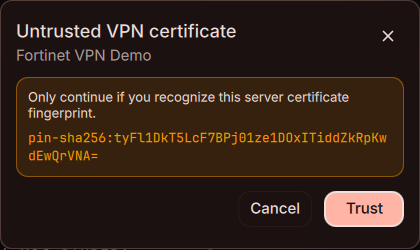
An approved certificate is remembered on the profile in the same format an
openfortivpn trusted-cert line uses, so a certificate you approve in DMS stays
usable with openfortivpn, and a trusted-cert line you imported is honoured on the
first connect.
Approving a certificate adds to that list rather than replacing it, which keeps gateways
that answer from more than one node working.
Certificate approval is only remembered when the connection was started from DMS.
Started from nmcli, a desktop applet, or autoconnect, the approval applies to that one
connection and the prompt returns next time.
GlobalProtect gateways
GlobalProtect profiles that use SAML authenticate through gp-saml-gui, which DMS launches to open a browser window and then captures the resulting cookie. See System Diagnostics for the dependency.
Troubleshooting
The import failed
The format needs a plugin you do not have. openfortivpn configs and any other
OpenConnect profile need the openconnect plugin; the rest need
the plugin named in the import table.
No browser opened
DMS opens the login page with xdg-open. Check that a default browser is set:
xdg-settings get default-web-browser
The browser signs in but the connection never starts
The gateway is redirecting to a port DMS is not listening on. Compare the port in the gateway's SAML configuration with the profile's:
nmcli connection show <profile> | grep saml-port
The certificate prompt comes back every time
The connection is being started outside DMS. Connect from the Control Center or from Settings once, and the approval is saved to the profile.