Dank16
Dux Shell
Dank16
The dms dank16 command generates a 16 color terminal palette from a single input color, with a contrast floor applied against the background so text stays readable in both light and dark mode.
Overview
Dank16 fills the 16 ANSI slots directly. It is not base16: there is no base00-base0F monochrome ramp, and the bright slots 9-15 are genuinely brighter rather than repeats of their normal counterparts. If you are looking for something to feed a base16 template, this is not it.
What it does:
- fills all 16 ANSI slots from one color
- dark and light variants, with separate contrast targets for each
- two contrast algorithms, Delta Phi Star (default) or WCAG
- terminal configs, JSON, and the variant JSON that matugen templates consume
- custom background, so the palette is built against the surface it will actually sit on
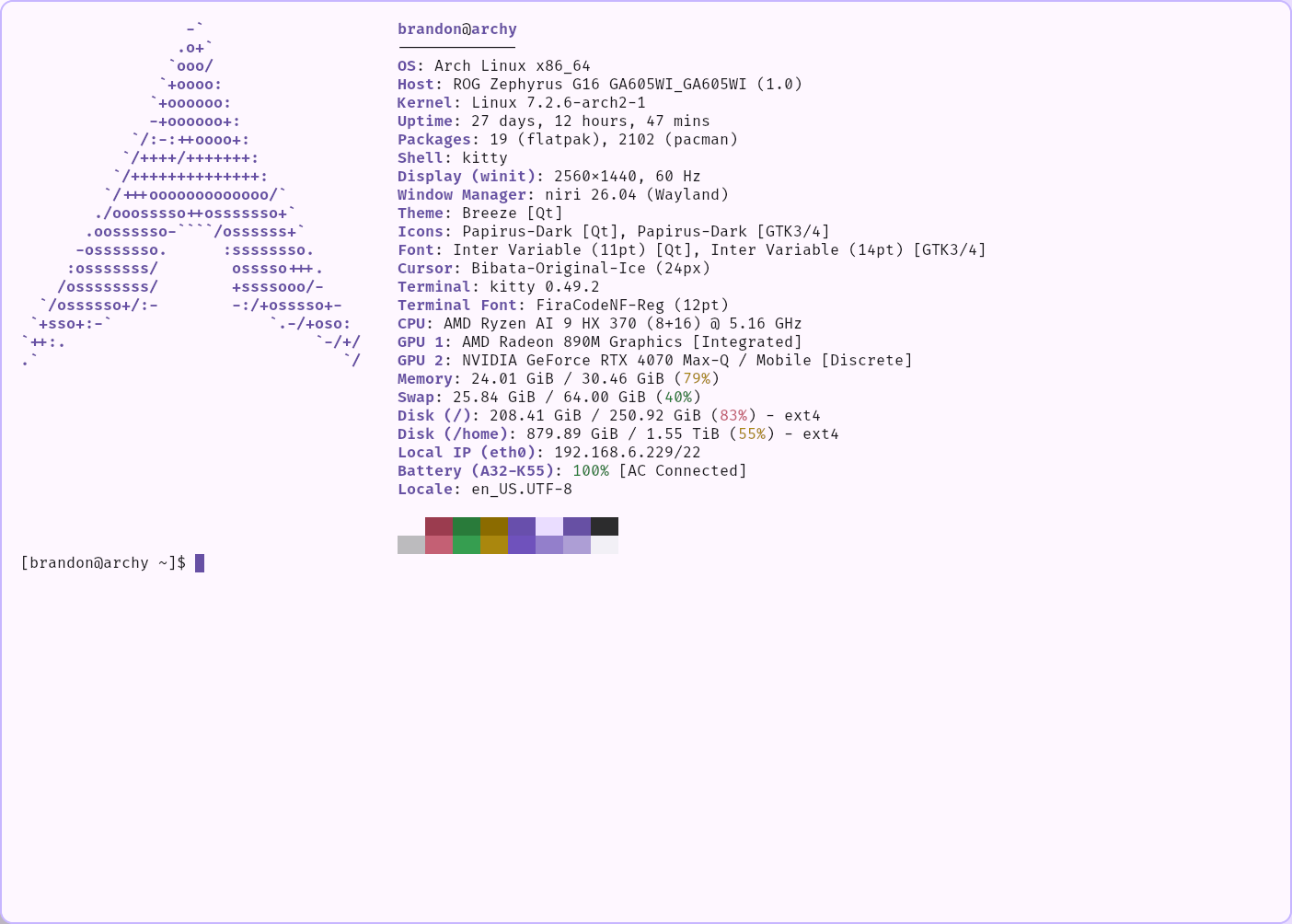
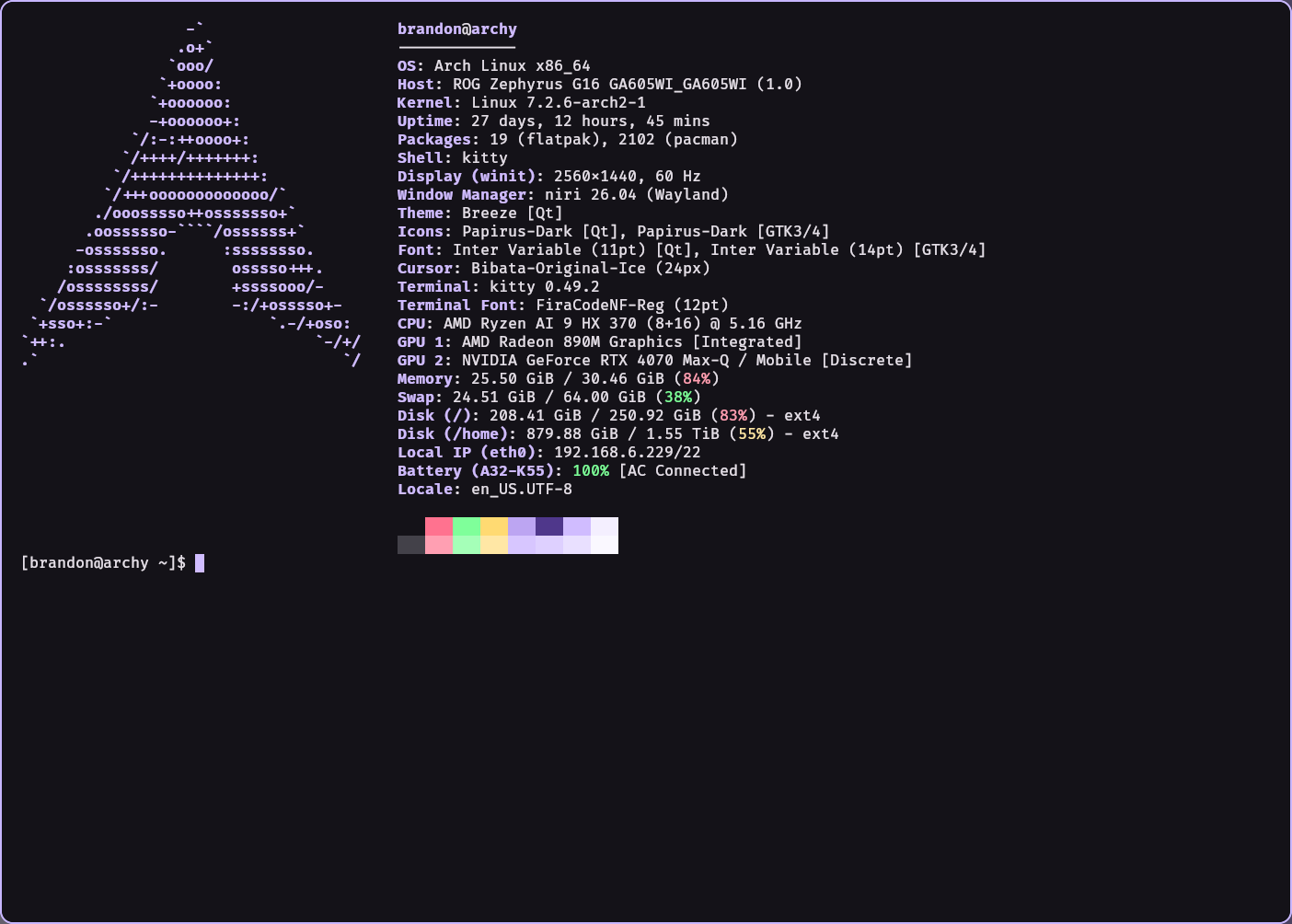
Quick Start
Generate a dark theme palette:
dms dank16 "#8b5cf6"
Output:
palette = 0=#1a1a1a
palette = 1=#ff4f73
palette = 2=#5bf67c
palette = 3=#ffd14f
palette = 4=#9d61ff
palette = 5=#220071
palette = 6=#8b5cf6
palette = 7=#f1ebff
palette = 8=#4b4853
palette = 9=#ff879f
palette = 10=#8fffa7
palette = 11=#ffe18f
palette = 12=#a077ff
palette = 13=#b18fff
palette = 14=#cdb7ff
palette = 15=#f9f7ff
Generate a light theme palette:
dms dank16 "#8b5cf6" --light
Output:
palette = 0=#f8f8f8
palette = 1=#d4214e
palette = 2=#008105
palette = 3=#946500
palette = 4=#7c4bf2
palette = 5=#dbcbff
palette = 6=#8b5cf6
palette = 7=#424144
palette = 8=#bbbabe
palette = 9=#ef5072
palette = 10=#00a018
palette = 11=#b08100
palette = 12=#844fff
palette = 13=#9676e3
palette = 14=#c7afff
palette = 15=#faf8ff
Color Slots
Every slot carries the primary hue to some degree. Reds, greens and yellows keep their own base hue but get pulled part of the way toward the primary so the palette reads as one set. The rest are the primary family outright.
| Slot | ANSI role | What it is |
|---|---|---|
| 0 | black | the background, verbatim |
| 1 / 9 | red | hue 0, pulled 12% toward the primary |
| 2 / 10 | green | hue 119, pulled 10% |
| 3 / 11 | yellow | hue 50, pulled 4% |
| 4 / 12 | blue | the primary hue, saturation and value nudged |
| 5 / 13 | magenta | 5 is the primary container, 13 is its brighter sibling |
| 6 / 14 | cyan | 6 is the primary verbatim, 14 is a lighter desaturated variant |
| 7 / 15 | white | near neutral, tinted at the primary hue |
| 8 | bright black | a fixed L* offset from the background, so it stays dim no matter how bright the primary is |
The primary slots
Three pairs are the primary family, and two of them are exact:
- 6 is the primary itself, unmodified and with no contrast adjustment. Whatever color you hand dank16 is what lands in slot 6.
- 5 is the primary container. When the caller has a real
primary_container(which is how DMS drives it through matugen) that value is used verbatim. The standalone CLI has no theme to read, so it derives an approximation from the primary instead. - 4, 12, 13 and 14 are variations on the same hue at different saturation and value.
Slot 5 and slot 6 are a pair. Their contrast is with each other, not with the background, which is the Material tone pairing: roughly 5.5:1 in dark mode and 5.0:1 in light. Plenty of powerline prompt themes use ANSI 5 on ANSI 6 for exactly this reason, so that relationship is treated as the invariant.
The consequence is that slot 5 on its own is a surface tone and sits close to the background. That is deliberate. It is a container, and its readable partner is the primary, not the terminal background.
What this costs you
Magenta and cyan are not independent hues here, they are the primary ramp. With a blue-violet primary, ANSI blue, magenta and cyan all read as the same violet family, and slots 4, 6 and 12 in particular can land within a few units of each other. Anything relying on ANSI 4 vs 5 vs 6 for semantic separation, like some git decorations or ls colors, loses that separation.
In light mode slot 0 is the light background, so ANSI black is the background color. Programs that print with \e[30m expecting dark text will write background on background.
Output Formats
Default Format
The default output is a simple palette format:
dms dank16 "#8b5cf6"
Kitty Terminal
dms dank16 "#8b5cf6" --kitty
Output:
color0   #1a1a1a
color1   #ff4f73
color2   #5bf67c
color3   #ffd14f
...
Copy the output directly to your ~/.config/kitty/kitty.conf.
Foot Terminal
dms dank16 "#8b5cf6" --foot
Generates color configuration for the Foot terminal emulator.
Alacritty Terminal
dms dank16 "#8b5cf6" --alacritty
Generates YAML configuration for Alacritty's color scheme.
Ghostty Terminal
dms dank16 "#8b5cf6" --ghostty
Generates configuration for the Ghostty terminal emulator.
JSON Format
dms dank16 "#8b5cf6" --json
Outputs the palette as a JSON object with detailed color information.
Variants Format
dms dank16 "#8b5cf6" --variants [--light] [--background <color>]
Outputs all color variants in a single call:
{
  "color0": {
    "dark": {
      "hex": "#1a1a1a",
      "hex_stripped": "1a1a1a",
      "hex_alpha": "#1a1a1aff",
      "hex_alpha_stripped": "1a1a1aff",
      "alpha_hex": "#ff1a1a1a",
      "alpha_hex_stripped": "ff1a1a1a",
      "rgb": "rgb(26, 26, 26)",
      "rgba": "rgba(26, 26, 26, 1.0)",
      "hsl": "hsl(0.0, 0.0%, 10.2%)",
      "hsla": "hsla(0.0, 0.0%, 10.2%, 1.0)",
      "red": "26",
      "green": "26",
      "blue": "26",
      "alpha": "1.0",
      "hue": "0.0",
      "saturation": "0.0%",
      "lightness": "10.2%"
    },
    "light": {
      "hex": "#f8f8f8",
      "hex_stripped": "f8f8f8",
      "hex_alpha": "#f8f8f8ff",
      "hex_alpha_stripped": "f8f8f8ff",
      "alpha_hex": "#fff8f8f8",
      "alpha_hex_stripped": "fff8f8f8",
      "rgb": "rgb(248, 248, 248)",
      "rgba": "rgba(248, 248, 248, 1.0)",
      "hsl": "hsl(0.0, 0.0%, 97.3%)",
      "hsla": "hsla(0.0, 0.0%, 97.3%, 1.0)",
      "red": "248",
      "green": "248",
      "blue": "248",
      "alpha": "1.0",
      "hue": "0.0",
      "saturation": "0.0%",
      "lightness": "97.3%"
    },
    "default": {
      "hex": "#1a1a1a",
      "hex_stripped": "1a1a1a",
      "hex_alpha": "#1a1a1aff",
      "hex_alpha_stripped": "1a1a1aff",
      "alpha_hex": "#ff1a1a1a",
      "alpha_hex_stripped": "ff1a1a1a",
      "rgb": "rgb(26, 26, 26)",
      "rgba": "rgba(26, 26, 26, 1.0)",
      "hsl": "hsl(0.0, 0.0%, 10.2%)",
      "hsla": "hsla(0.0, 0.0%, 10.2%, 1.0)",
      "red": "26",
      "green": "26",
      "blue": "26",
      "alpha": "1.0",
      "hue": "0.0",
      "saturation": "0.0%",
      "lightness": "10.2%"
    }
  },
  ...
}
| Variant | Description |
|---|---|
dark | Always dark mode colors |
light | Always light mode colors |
default | Mode-aware (uses --light flag to determine which variant) |
Use --primary-dark and --primary-light to specify different primary colors for each mode:
dms dank16 --variants --primary-dark "#8b5cf6" --primary-light "#6d28d9"
This is the format injected into matugen templates as the dank16 object.
Contrast Algorithms
Dank16 supports two contrast algorithms to ensure readability:
Delta Phi Star (DPS) - Default
Delta Phi Star works in CIELAB and weights lightness with the golden ratio, which tracks perceived contrast better than a plain luminance ratio.
dms dank16 "#8b5cf6" --contrast dps
How it works:
- Converts colors to CIELAB space (L*, a*, b*)
- Calculates lightness contrast using:
Lc = (|Lb^φ - Lf^φ|)^(1/φ) × 1.414 - 40 - Adds 5 for dark polarity
- Walks L* until the target is met, which keeps the hue intact
Delta Phi Star is not symmetric across polarity. The same Lc buys much less real contrast on a light background than on a dark one, so the two modes use different targets picked to land on the same measured ratios:
| Normal text | Accent slots | |
|---|---|---|
| Dark | Lc 40 | Lc 24.5 |
| Light | Lc 70 | Lc 58 |
Both of those come out around 4.8:1 and 3.3:1 respectively.
WCAG Contrast
The standard WCAG 2.1 ratio, targeting 4.5:1 for normal text and 2.1:1 for accent slots. Same number in both modes, since the ratio is already polarity independent.
dms dank16 "#8b5cf6" --contrast wcag
Advanced Options
Custom Background
Every contrast decision is made against the background, and the background also becomes slot 0. Pass the surface the palette will actually sit on, otherwise the floor is computed against the wrong thing and the result will be too dark or too washed out in practice:
# Dark theme with custom background
dms dank16 "#8b5cf6" --background "#0d1117"

# Light theme with custom background
dms dank16 "#8b5cf6" --light --background "#ffffff"
With --variants the flag sets the dark variant's background. The light variant is built against its own default, since a dark surface is not a sane background for a light palette. DMS passes both surfaces when it drives the generator directly.
Combining Options
All options can be combined:
dms dank16 "#8b5cf6" \
  --light \
  --background "#fafafa" \
  --contrast wcag \
  --kitty > ~/.config/kitty/dank-light.conf
Algorithm Overview
The palette generation process follows these steps:
-
Resolve the container: use the
primary_containerthe caller supplied, or derive one from the primary by scaling saturation and value. This becomes slot 5 and seeds the near neutral slots. -
Pick the background: the
--backgroundvalue, otherwise a mode appropriate default. This becomes slot 0. -
Generate the hues: red, green and yellow from their own base hue blended part way toward the primary. Blue, magenta and cyan from the primary family.
-
Enforce contrast: every slot except 5 and 6 is walked in L* (or HSV on the WCAG path) against the background until it clears its target. Hue is preserved so colors keep their identity. Slots 5 and 6 are skipped because they pair with each other.
-
Dim slot: slot 8 is placed at a fixed L* offset from the background rather than by contrast, so bright black stays dim regardless of the primary.
Use Cases
Terminal Theming
Generate consistent color schemes for your terminal:
# Kitty
dms dank16 "#your-color" --kitty >> ~/.config/kitty/kitty.conf

# Foot
dms dank16 "#your-color" --foot >> ~/.config/foot/foot.ini

# Alacritty
dms dank16 "#your-color" --alacritty >> ~/.config/alacritty/alacritty.yml
Editor Themes
VSCode and other editors get their terminal colors automatically through DMS's built-in theming. The dank16 palette is also available in your custom matugen templates via the dank16 object. See the Application Theming docs for details.
Dynamic Theming
Generate themes based on wallpaper colors or system accents:
#!/bin/bash
# Extract dominant color from wallpaper
dominant_color=$(your-color-extraction-tool ~/wallpaper.jpg)

# Generate and apply terminal theme
dms dank16 "$dominant_color" --kitty > ~/.config/kitty/auto-theme.conf
kitty @ set-colors -a ~/.config/kitty/auto-theme.conf
Light/Dark Mode Automation
Create matching light and dark variants:
#!/bin/bash
COLOR="#8b5cf6"

# Generate both variants
dms dank16 "$COLOR" --kitty > ~/.config/kitty/dank-dark.conf
dms dank16 "$COLOR" --light --kitty > ~/.config/kitty/dank-light.conf

# Switch based on time or system setting
if is_dark_mode; then
    kitty @ set-colors -a ~/.config/kitty/dank-dark.conf
else
    kitty @ set-colors -a ~/.config/kitty/dank-light.conf
fi
Tips & Best Practices
Choosing Input Colors
Pick the color you want prominent in the terminal. It lands verbatim in slot 6 and drives slots 4, 5, 12, 13 and 14, so it shows up wherever a program prints blue, magenta or cyan. Red, green and yellow stay recognisably themselves and only get pulled a few percent toward it.
A heavily desaturated or very dark input gives the generator little to work with. There are saturation and value floors to stop the whole palette collapsing to mud, but the result will still be flat compared to a vivid input.
Testing Contrast
After generating a palette, test it with actual terminal applications:
# Generate palette
dms dank16 "#8b5cf6" --kitty > /tmp/test-theme.conf

# Open new kitty window with theme
kitty -o include=/tmp/test-theme.conf
Iterating on Themes
Try slight variations of your input color to find the perfect palette:
# Try different shades
dms dank16 "#8b5cf6"  # Original
dms dank16 "#9b6cf6"  # Slightly lighter
dms dank16 "#7b4ce6"  # Slightly darker
Command Reference
dms dank16 <hex_color> [flags]
Arguments:
hex_color(required): Input color in hex format (e.g., "#8b5cf6" or "8b5cf6")
Flags:
--light: Generate light theme variant (sets default to light)--background <hex>: Custom background color. With--variantsthis is the dark variant's background--contrast <algorithm>: Contrast algorithm: dps (Delta Phi Star, default) or wcag (default "dps")--kitty: Output in Kitty terminal format--foot: Output in Foot terminal format--alacritty: Output in Alacritty terminal format--ghostty: Output in Ghostty terminal format--json: Output in JSON format--variants: Output all variants (dark/light/default) as JSON--primary-dark <hex>: Primary color for dark mode (use with--variants)--primary-light <hex>: Primary color for light mode (use with--variants)--wezterm: Output in Wezterm terminal format--neovim: Output in Neovim plugin format-h, --help: Show help