Introducing DankCalendar
DankCalendar
0.2 · Latest Release
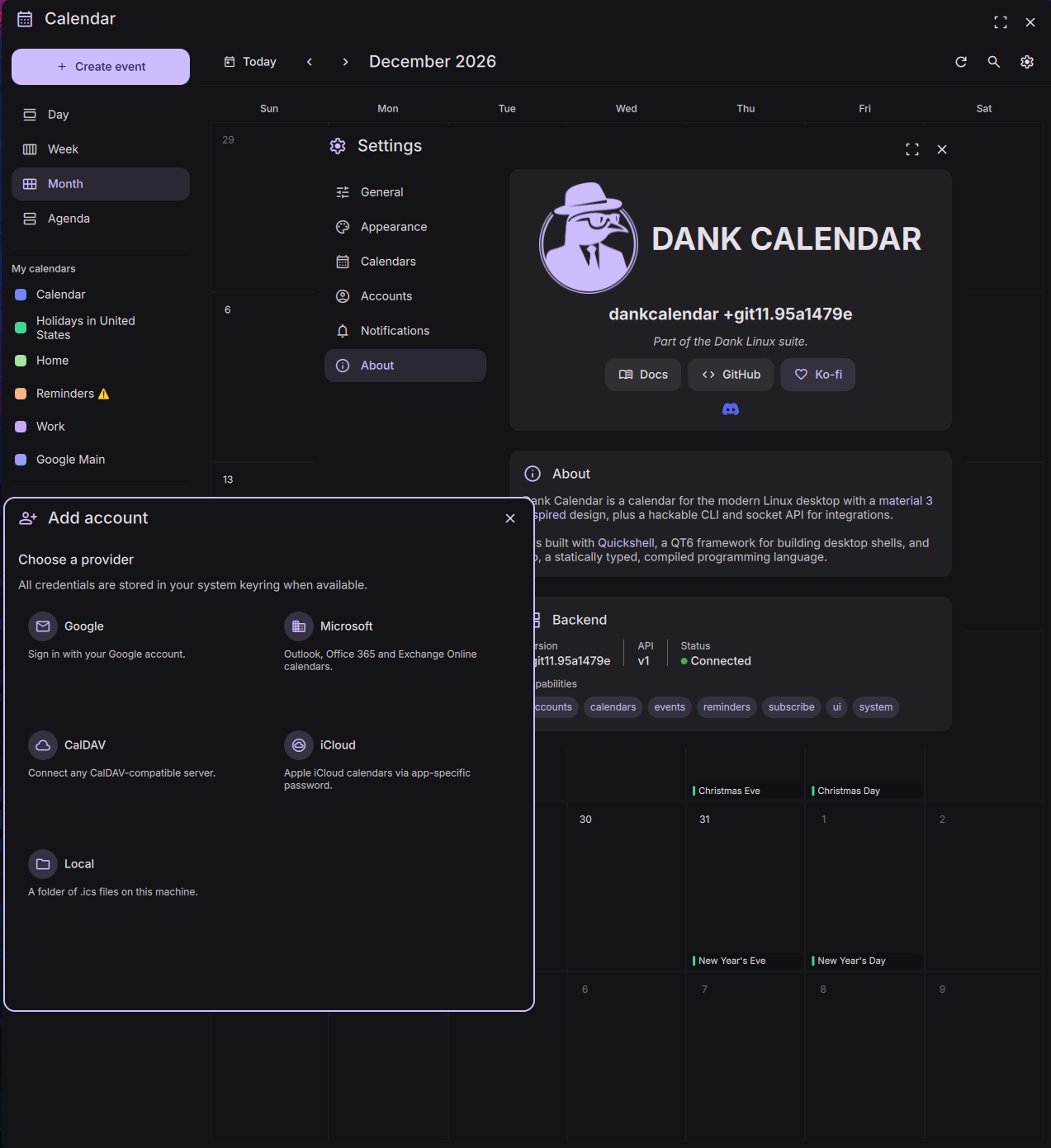
DankCalendar is a solution for calendar management on Linux that unifies Local, Google, Microsoft, CalDAV, and iCloud calendars into a single agenda. It features background synchronization, native event reminders, secure credential storage, a comprehensive GUI, keyboard-driven navigation, and a scriptable IPC interface. It is available now on every DankLinux-supported distro: Arch (AUR), Fedora, Debian, Ubuntu, and openSUSE.
Every Calendar, One View
Connect Local, Google, Microsoft, CalDAV, and iCloud accounts and see them all in a single unified agenda.
Background Sync
A lightweight daemon keeps accounts in sync and serves notifications.
Event Reminders
Native desktop notifications for upcoming events, configurable per-event and per-calendar.
Secure by Default
OAuth tokens and account secrets are stored in your system keyring, not in plaintext config files.
Keyboard First
Full keyboard-driven navigation with a shortcuts overlay and spotlight-style event search.
Scriptable IPC
A full IPC surface for compositor keybinds and automation. Toggle, query events, and more from scripts.
Built into DMS v1.5
DMS v1.5 detects a running dcal daemon and uses it as a calendar backend over IPC, with no extra setup.
- Unified agenda in DankDash. The calendar card shows your real events from every connected account, color-coded per calendar.
- Create and edit events from the shell. You can add, edit, and delete events right in DankDash. The old khal integration was read-only, so this is new.
- Keyboard navigation throughout. Move around the agenda, open event details, and dismiss it all from the keyboard.
- Native reminders. Upcoming-event notifications come through the DMS notification system you already use.
- A backend selector lives in Settings > Time & Weather (Auto, khal, or DankCalendar), along with a Launch DankCalendar button.
If dcal isn't running, DMS falls back to khal, so nothing breaks.
Credentials and data
There's no DankLinux server involved. dcal talks to Google, Microsoft, your CalDAV or iCloud host, or your local .ics files directly, so your events and tokens never leave your machine. For Google and Microsoft you create your own OAuth app, so the whole connection is yours.
- Credentials go in your system keyring (e.g. GNOME Keyring, KWallet) rather than your config files. If no keyring is available,
dcalfalls back to an encrypted on-disk store. - Synced calendars and events are cached in a local SQLite database under
~/.local/share/dankcal/, following the XDG base directory spec. Everything works offline, and sync catches up when you're back online. - The daemon listens on a per-user Unix socket in
$XDG_RUNTIME_DIR, scoped to your login session. It's not a network port.
Getting Started
DankCalendar ships as dankcalendar-git, a rolling build from upstream master, across the DankLinux repositories. On Arch you can also use the prebuilt dankcalendar-bin AUR package.
Arch Linux (AUR)
yay -S dankcalendar-bin    # prebuilt binary
# or
yay -S dankcalendar-git    # build from latest git
Fedora & CentOS (COPR)
sudo dnf copr enable avengemedia/danklinux
sudo dnf install dankcalendar-git
Debian (OBS) and Ubuntu (PPA) first enable the DankLinux repository, then:
sudo apt install dankcalendar-git
openSUSE (OBS)
sudo zypper install dankcalendar-git
Repository setup commands for each Debian release, Ubuntu, and openSUSE variant are in the installation guide. You can also build from source with git clone and make install.
You can connect accounts from the GUI or the CLI.
dcal run                  # Launch DankCalendar
dcal account add google   # or microsoft, caldav, icloud, local
DankCalendar runs as a daemon, so closing the window only hides it and sync and reminders keep running in the tray - you can change the close behavior in settings. Enable Start at login from Settings, or install the systemd user service.
See the DankCalendar documentation for full installation, account setup, and IPC reference.
Updates since v0.1
DankCalendar has moved quickly since the initial release. v0.2.0 is the latest; here are the headline additions from v0.1.1 through v0.2.0.
Calendar sources
- iCal feeds and webcal URLs — Subscribe to public calendar feeds and open
webcal://links directly. - Evolution Data Server — Read calendars already managed by GNOME Evolution without duplicating account setup.
Tasks, events, and reminders
- Tasks and reminders (VTODO) — View and manage tasks from every connected provider, not just calendar events.
- Event RSVP — Accept or decline invitations from inside DankCalendar.
- Meeting links — Video call URLs are parsed from events and shown in event details and reminders.
- Event-driven reminders — The reminder scheduler wakes on upcoming events instead of polling on a fixed interval.
UI and navigation
- Theme engine — Custom themes plus a native colorscheme watcher that follows your system light/dark preference.
- Sidebar — Resizable, collapsible, and scrollable, with long calendar names elided cleanly.
- Month view — Scroll through dense months and expand a day to see every event when a cell overflows.
- Day and week views — A time-of-day indicator marks your current position in the schedule.
- View shortcuts —
Ctrl+1throughCtrl+5jump between agenda views. - Quick create — Double-click a time slot to start a new event.
- Close behavior — Choose whether the window close button hides DankCalendar or quits entirely.
IPC and integration
- Open in a specific view — IPC can show the calendar already focused on month, week, day, or agenda.
Translations
- More languages — Dutch, Italian, Vietnamese, Spanish, Hebrew, Russian, Ukrainian (with RTL), Polish, and Chinese Simplified.
See the full release history on GitHub for version-by-version notes.
Why a new Linux calendar?
It fits the Dank philosophy of focused tools (dgop, dsearch) that do one thing well and integrate together, without unnecessary dependencies or assumptions about your setup. The calendar is a core part of the user experience, so it deserves a first-party solution that works well with the shell and with your existing accounts.
khal and vdirsyncer are scriptable and lightweight, but they're two tools you wire together yourself. You write a vdirsyncer config, set up OAuth tokens by hand, run sync on a cron, then point khal at the output. It's not a user-friendly or comprehensive solution.
Evolution and Evolution Data Server are powerful, but they're tied to the GNOME desktop and incredibly difficult to build on or integrate with. The calendar is just one part of a huge suite of apps sharing the EDS backend.
- The calendar is buried inside an Outlook-style suite, and account setup is spread across GNOME Settings, GNOME Online Accounts, and Evolution itself, so it's never clear which one actually owns a calendar.
- EDS is a shared backend, which is a good idea, but its API is GObject/C with async GLib and very few real examples. Writing a launcher widget, a shell card, or a CLI against it means digging through source-registry concepts and
ECalClientinstead of calling something simple. - It drags in a heavy GTK and WebKitGTK stack and assumes you're on GNOME, which is awkward on niri, Hyprland, Sway, KDE, or a custom shell.
DankCalendar keeps the good part of that idea, one synced backend that lots of things can read, but makes it pleasant to use and to build on: sign-in style account setup, a local cache that works offline, a documented IPC API (dcal ipc events.list, events.create, and so on) with JSON output, and a daemon-plus-frontends design that behaves the same on any compositor.
Resources
Read the DankCalendar docs →
Join the community
DankCalendar is brand new, so feedback and bug reports go a long way. Come hang out in the #dms channels on the niri Discord, or open an issue on GitHub. Providers, widgets, and translations are all welcome.